Philips Consumer Electronics Recalls Plasma Flat Panel Televisions
The hazard
Arcing by capacitors inside the left and right side of the back cabinets of these TVs can pose a safety risk.
Incidents reported: Philips has received nine reports of arcing by the capacitors. The results of such incidents were contained within the TVs, due to the use of flame retardant materials, resulting only in damage to the TV. There have been no injuries reported.
What to do now
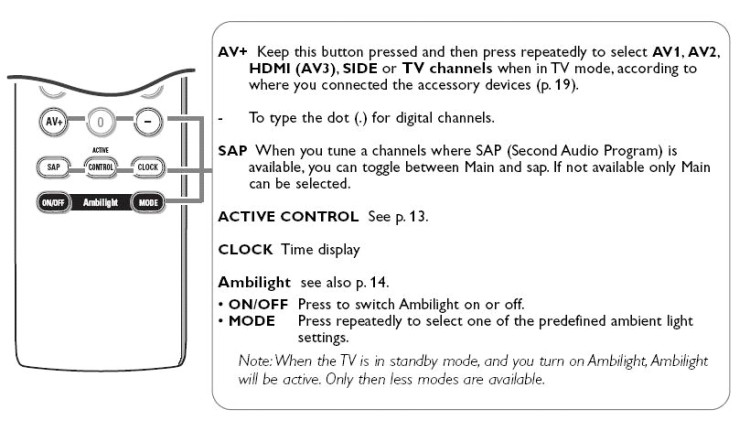
Consumers should immediately turn off the Ambilight feature (see instructions in the picture) and contact Philips for instructions on how to receive free in-home service to have their TV repaired for free.
Contact: For more information, contact Philips at (888) PHILIPS [888-744-5477] anytime. When you call this number, an automated voice attendant will ask you to say or enter a "Priority PIN number." Please enter the numbers "4445" and you will be put in contact with a Philips representative who will assist you. Consumers also can go to the firm's Web site at www.philips.com, or write to Philips at V.P. Service, Philips Consumer Electronics North America, 64 Perimeter Center East, Atlanta, GA 30346
About this recall
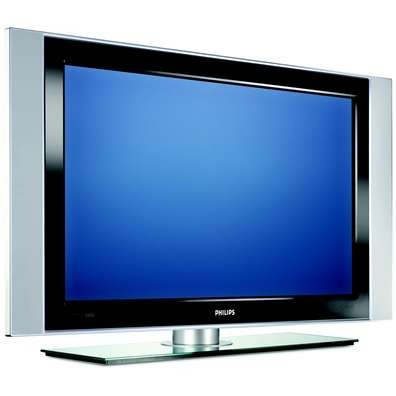
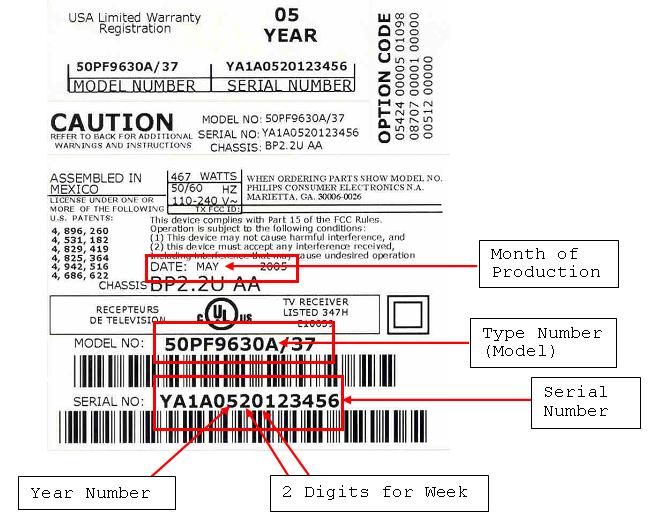
The recall involves only certain 42- and 50-inch, 2005 model Philips branded Plasma Flat Panel Televisions with Ambilight technology, which is an ambient lighting feature that projects a soft light onto the wall behind the TV to enhance the display. They were manufactured with the following model, date codes, and serial numbers: Model Display Type Production Began Production Ended Beginning Serial Range Ending Serial Range 42PF9630A/37 Plasma April 2005 July 2005 AG1A0518xxxxxx AG1A0528xxxxxx 50PF9630A/37 Plasma May 2005 August 2005 AG1A0519xxxxxx AG1A0533xxxxxx 50PF9630A/37 Plasma June 2005 August 2005 YA1A0523xxxxxx YA1A0534xxxxxx 50PF9830A/37 Plasma June 2005 August 2005 AG1A0526xxxxxx AG1A0533xxxxxx The model and serial numbers can be found on the back of the TV on the label that looks like the example in the picture: The serial number can also be obtained by pushing the following keystrokes on the remote control: 123654, after which a customer service menu ("CSM") will be displayed on the screen. In the menu, line 03 displays the type number and line 04 displays the production code (identical to the serial number of the set). Press the MENU button on the remote to exit the CSM.
Product photos
Photos: U.S. CPSC